Time / JAY CLOUD JOURNAL
ADP Time Clock Alternative for SAP, Workday & HiBob
Looking for an ADP time clock alternative? Compare HCM-native time capture for SAP, Workday and HiBob, with connected access and emergency roll call.
Poksundo Team ·
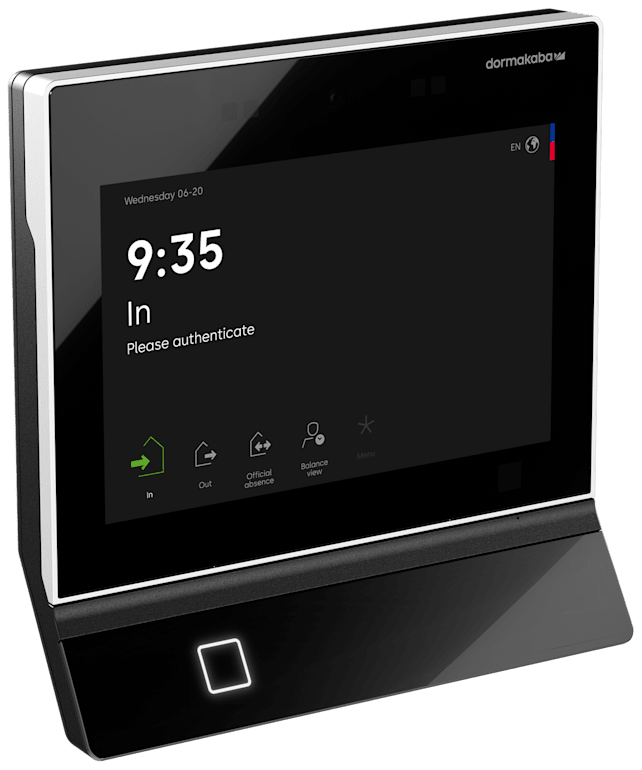
An ADP time clock alternative is worth evaluating when SAP SuccessFactors, Workday or HiBob—not ADP—is your HR system of record. The key difference is architecture: HCM-native time capture can avoid an additional workforce-data sync, while a connected workplace layer can also support door access and emergency accountability.
ADP is generally positioned as an established payroll and workforce-management provider, with time-and-attendance options typically spanning web timesheets, smart time clocks, kiosks and mobile apps. That breadth deserves consideration. Verify current capabilities with ADP, particularly for your product, region and existing HR environment.
The buying question is not simply which clock employees should use. It is which system should govern employee identities, working-time records and workplace permissions—and how many separate processes your teams should maintain.
When an ADP time clock alternative makes sense
Start with your system of record. If ADP owns your core employee data and payroll processes, an ADP-centered time solution may be a sensible fit. If SAP SuccessFactors, Workday or HiBob already owns that data, evaluate whether another time platform adds useful functionality or creates another synchronization boundary.
That boundary matters during everyday changes. A new hire needs a recording identity. A transfer may change a shift model and building permissions. A departure should not leave an active workplace identity behind because someone missed a separate administrative task.
An additional integration is not automatically a problem. It can be well designed and well governed. But it creates another place to define ownership, mapping, update timing, error handling and reconciliation.
For an organization using a different HCM, the decision should therefore begin with three questions:
- Which system owns employee identity and employment status?
- Where should working-time records enter the HR process?
- Should the same workforce data also govern doors, visitors and emergency accountability?
If those answers point back to your HCM, prioritize an HCM-native architecture rather than treating the clock as an isolated purchase.
Compare the architecture, not just the clock
A wall terminal, browser timesheet and mobile app are employee interfaces. Behind them sits the more important design: how identities, rules and records move between systems.
jay cloud by Poksundo is a connected layer for Time, Access, Visitor and Life Safety, driven by HCM data. It has five native HCM connections: SAP, Workday, HiBob, Hubdrive and Access People. Its time-recording options include terminals, mobile and browser recording, plus employee self-service.
The following matrix separates device choices from the integration questions that determine long-term fit.
| Decision area | ADP-centered evaluation | HCM-driven jay cloud evaluation |
|---|---|---|
| HR system of record | Confirm fit with your ADP environment or another HCM | Native connections include SAP, Workday and HiBob |
| Employee time capture | Verify available web timesheets, smart clocks, kiosk and mobile options | Terminal, mobile and browser time recording |
| Workforce-data flow | Confirm synchronization ownership, timing and error handling | Workforce data comes from the connected HCM |
| Employee changes | Ask how hires, transfers and departures reach each connected system | Access rights, shift models and visitor policies derive from HR data |
| Physical workplace scope | Verify the required integrations and current capabilities | Connected Time, Access, Visitor and Life Safety layer |
| Emergency accountability | Verify how employee and visitor presence is established | Emergency roll call combines time, access, visitor and HR records |
| Infrastructure | Confirm the deployment model for the proposed solution | 100% cloud, with no on-premise infrastructure |
This is an architecture comparison, not a claim that one vendor lacks a particular feature. Ask each vendor to demonstrate the same workflow against your requirements. Product names, bundles and regional availability can change.
What HCM-native time capture changes
HCM-native time capture is most useful when it makes employee lifecycle ownership clearer. Instead of maintaining a separate employee population independently, the time layer follows the workforce data held in your HCM.
jay cloud describes its operating model in three steps: connect the HCM and sync workforce data; derive workplace rules such as access rights, shift models and visitor policies from HR data; then let hires, moves and departures drive workplace changes without tickets.
That can avoid introducing another independent workforce-data sync merely to keep a separate time-clock population current. It does not mean every downstream process disappears. Payroll exports, approvals, exception handling and local configurations still deserve explicit review during selection.
SAP SuccessFactors
For SAP organizations, jay cloud is native on SAP Business Technology Platform and was developed in close cooperation with SAP through the Co-Innovation Program. It has a SAP-certified interface for SuccessFactors Time Tracking Service and Time Sheet.
Those are specific integration facts, not a blanket promise that every SAP configuration requires no implementation work. Review the SAP listing for jay cloud, then map your recording and approval requirements. Our guide to SAP SuccessFactors time clock integration covers the questions to bring into that assessment.
Workday and HiBob
jay cloud also has native HCM connections for Workday and HiBob. Organizations using either platform should assess the proposed data flow against their own employment structures, site assignments and recording policies.
Ask for a walkthrough of an employee joining, changing department and leaving. For Workday-specific planning, see our guide to Workday time clock and access integration.
The important test is whether the design follows your authoritative HR data—not whether the demonstration looks convenient with a small sample workforce.
Connect time capture to doors without confusing the records
Working time and physical presence are related, but they are not interchangeable. A clock-in records a time event; a door event records an access interaction. Neither should automatically be treated as perfect evidence of who remains inside a building.
A useful evaluation considers both records while keeping their purposes distinct. For example, a manufacturing employee may record time at a terminal, require access to a restricted zone and need inclusion in emergency accountability. Managing those as unrelated identities creates unnecessary reconciliation work.
jay cloud brings time and access into the same HCM-driven workplace layer. Access rights and shift models derive from HR data, and hardware for time and access can be integrated. Central device management includes automatic updates and security patches.
That does not remove the need for a site survey. Confirm the suitability of your actual terminals, readers and electronic doors, along with installation responsibilities and operating procedures.
During a demonstration, use a realistic transfer scenario: an employee changes department and site. Ask the vendor to show how the change reaches time recording and workplace permissions, which rules apply, and what administrators can audit. Then repeat the exercise for a departure; our guide to offboarding and physical access revocation provides a useful planning framework.
Add muster requirements before choosing the system
Emergency accountability should not be an afterthought to a time-clock replacement. Employees, contractors and visitors may enter through different workflows, so an employee timesheet alone is not a complete site population.
jay cloud's Life Safety capabilities include real-time attendance status, intelligent muster points and audit-ready visibility. Its emergency roll call combines time, access, visitor and HR records.
The operational questions remain important: who runs the roll call, how exceptions are investigated, and how people are accounted for when records are incomplete. Software supports the process; it does not replace an evacuation plan, trained personnel or drills.
For planning, use our emergency headcount guide alongside the OSHA evacuation plans and procedures resource. Confirm applicable obligations with counsel and your safety team rather than treating a product capability as proof of compliance.
Run a workflow-based evaluation
A good shortlist exercise follows an employee through the workplace rather than stopping at a successful clock-in. Bring HR, payroll, IT, facilities and security into the same review so that each integration boundary has an owner.
Use a small set of acceptance scenarios:
- New hire: establish the identity, recording method and permitted workplace access.
- Transfer: change the department, site and relevant workplace rules.
- Time exception: explain how an incomplete or disputed record is resolved.
- Departure: verify that the employment change reaches workplace permissions.
- Evacuation: account for employees and visitors using the available records.
For each scenario, ask what happens automatically, what requires a human decision and what evidence remains afterward. Require vendors to distinguish standard functionality from configuration or additional integration work.
Security review should also be specific. jay cloud is architected on SAP BTP and provides end-to-end encryption, role-based access controls and full audit trails. Ask how those controls fit your identity, administration and retention requirements.
Finally, compare total operating effort rather than invented price assumptions. Request proposals covering implementation, device integration, administration, training and ongoing responsibilities. A native connection is valuable when it simplifies your actual operating model—not merely because the word “native” appears in a presentation.
Frequently asked questions
What is an ADP time clock alternative for SAP SuccessFactors?
jay cloud is an option to evaluate when SuccessFactors is your HR system of record. It offers terminal, mobile and browser time recording, is native on SAP BTP, and has a SAP-certified interface for SuccessFactors Time Tracking Service and Time Sheet. Validate the fit against your specific recording and approval processes.
Does an alternative need to replace payroll?
Not necessarily. Time capture, HR data ownership and payroll processing are separate architectural decisions. Ask each vendor to explain how records reach your payroll process and which system owns approvals, corrections and employee master data.
Can jay cloud connect time recording with access control?
Yes. jay cloud connects Time and Access within an HCM-driven workplace layer, with access rights and shift models derived from HR data. Confirm how your particular sites, devices and policies will be configured during evaluation.
Can time-clock records alone support emergency headcount?
They should not be treated as a complete picture without examining your workflows. Visitors, contractors and employees may have different recording patterns. jay cloud's emergency roll call combines time, access, visitor and HR records to support accountability.
Is ADP still worth evaluating if we use another HCM?
Yes, if its proposed time-and-attendance architecture fits your requirements. ADP is generally positioned as a broad payroll and workforce-management provider, but you should verify current capabilities and integration details directly. Compare it fairly with HCM-native options using the same lifecycle and site scenarios.
Choose around your system of record
The right ADP time clock alternative should follow your authoritative HR data and fit the way people work, enter buildings and are accounted for during an emergency. If SAP SuccessFactors, Workday or HiBob runs your workforce, talk to the jay cloud team about connecting time capture, access and muster around that HCM.