Time / JAY CLOUD JOURNAL
SAP SuccessFactors Time Clock Integration: A Guide
Plan SAP SuccessFactors time clock integration: connect workforce data, capture punches, manage corrections, and keep terminals updated and secure.
Poksundo Team ·
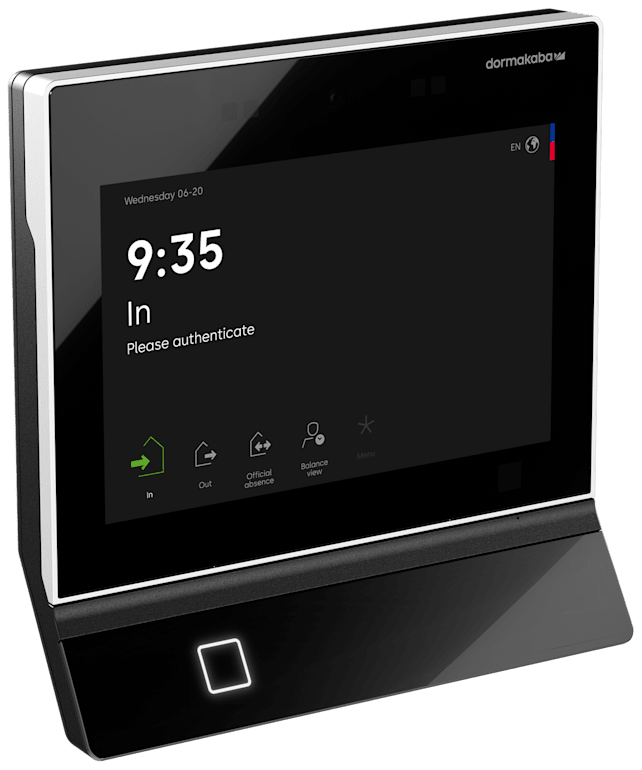
SAP SuccessFactors time clock integration connects physical attendance terminals with the workforce data and time processes managed in SuccessFactors. A sound design sends the right employee data toward terminals, returns clock events to the relevant time process, and defines how corrections, employee self-service, and device maintenance work.
The important question is not simply whether a terminal can transmit a punch. It is whether HR, IT, and operations can keep employee identities, recording rules, and devices aligned through hires, transfers, shift changes, and departures.
How SAP SuccessFactors time clock integration works
Think of the integration as two connected flows: workforce information moving toward the recording environment, and recorded working-time events moving back toward the time-management process. Corrections and approvals sit around those flows, while device management keeps the physical equipment maintained.
The exact configuration depends on your SuccessFactors environment, recording policies, and chosen solution. Treat the following as a design model to validate, not a promise that every connector implements every step identically.
| Integration layer | What it needs to accomplish | What to verify |
|---|---|---|
| Workforce master data | Associate the person recording time with the correct employee record | Identity mapping, required fields, effective dates, and departure handling |
| Terminal configuration | Make the appropriate recording options available at each location | Supported hardware, employee eligibility, and rule ownership |
| Clock-event flow | Deliver recorded events to the intended time process | Destination, event interpretation, timing, and error handling |
| Corrections and self-service | Let employees and authorized reviewers resolve discrepancies | Available actions, approvals, and the authoritative record |
| Device management | Keep terminals maintained across sites | Update process, security patches, responsibilities, and monitoring |
Keep these layers distinct during procurement. A working connector does not, by itself, settle questions about employee corrections or the maintenance of a terminal installed on a factory floor.
Start with workforce master data, not the terminal
A terminal needs to associate a recording action with the right person. That makes employee identity mapping the foundation of the project. Document which employee identifier connects the HCM record to the recording environment, which attributes are necessary, and who owns their accuracy.
Then map lifecycle changes. A new hire, a transfer to another location, and a departure are different events with different effective dates. Ask how each change reaches the recording environment and what happens when information is incomplete or inconsistent.
Avoid treating the initial employee import as the integration. The ongoing synchronization is what determines whether HR and the workplace remain aligned.
Where jay cloud fits
jay cloud by Poksundo is a connected layer for Time, Access, Visitor, and Life Safety, driven by HCM data. Its documented workflow begins by connecting the HCM system and synchronizing workforce data. Access rights, shift models, and visitor policies are then derived from HR data, with existing hardware brought into the setup.
For SAP environments, jay cloud was developed in close cooperation with SAP through the Co-Innovation Program and is native on SAP Business Technology Platform. It has a SAP-certified interface for SuccessFactors Time Tracking Service and Time Sheet; SAP lists the solution on its Poksundo jay cloud partner page.
These facts establish the integration's SAP foundation. Your evaluation should still confirm the specific master-data fields, mappings, and lifecycle behavior required by your implementation. For broader planning, see the SAP SuccessFactors time and attendance guide.
Define how clock events return to SuccessFactors
Recording an event and accepting it into a time process are separate steps. Before discussing terminal models, agree on what employees need to record and where those recordings belong.
For example, your requirements may include start and end events, breaks, or other recording categories. These are requirements to validate with the vendor and implementation team, not assumed capabilities of every terminal or connector.
Ask the team to demonstrate a complete journey: an employee records an event, the event reaches its intended destination, and an authorized person can determine whether it was accepted or needs attention. Include an unsuccessful example as well as a successful one.
Useful acceptance-test questions include:
- Which SuccessFactors service or process receives the recording?
- How are employee identities and recording categories mapped?
- How can support teams identify an event that needs attention?
- What happens if connectivity is interrupted or an event is submitted twice?
Do not assume offline storage, automatic retries, or duplicate prevention without confirmation. Request documented behavior for the proposed configuration and test it at a representative site.
jay cloud supports terminal, mobile, and browser time recording, with HCM-system-native time recording and employee self-service. Confirm how each selected channel feeds your SuccessFactors process and how employees should use those channels consistently.
Make corrections and employee self-service explicit
Missed recordings and incorrect entries should be part of the design workshop, not a problem discovered after launch. Decide where employees review their time, where they request or make corrections, and where approvals occur.
The central issue is record ownership. If an employee sees one version of a working day in a recording interface and another in the downstream time process, support teams need a clear way to explain and resolve the difference.
Document the correction workflow in plain language. An employee should know what to do after forgetting a recording. A reviewer should know which information to check. IT should know which component to investigate when a correction does not appear where expected.
What to ask about jay cloud
Employee self-service is a documented jay cloud Time capability. The fact sheet does not define individual correction actions or approval workflows, so those details should be demonstrated against your requirements.
Ask where a correction is entered, who can authorize it, and how the resulting record is represented in SuccessFactors. Confirm which audit information is available for the configured workflow rather than assuming that a general audit capability answers every time-correction question.
For shift-based operations, use examples from actual working patterns. The guide to time and attendance for manufacturing provides a useful starting point for framing operational requirements.
Plan terminal integration and central device management
Physical terminals introduce responsibilities that do not exist in a browser-only rollout. Someone must own installation, connectivity, configuration, maintenance, and troubleshooting across the device estate.
Build a hardware inventory before selecting a migration approach. Record each device's model, location, operational purpose, and current management arrangement. Then ask the proposed supplier to confirm the integration requirements for that inventory.
jay cloud states that all hardware for time and access can be integrated. It also provides central device management with automatic updates and security patches. Its platform is 100% cloud, with no on-premise infrastructure.
Those capabilities matter for distributed operations, but they do not remove the need to define local responsibilities. Ask how your particular terminals connect, what preparation is required, and how device updates are handled during operational hours. Do not assume that every existing device requires the same integration effort.
Separate platform maintenance from site readiness
Automatic updates and security patches address device-management work. They are not a substitute for confirming power, network availability, physical placement, and a local support route.
A practical rollout checklist should cover:
- A confirmed terminal inventory and integration scope.
- Clear ownership of connectivity and local troubleshooting.
- An agreed update and operational communication process.
- Tested recording and correction journeys at each pilot location.
Choose a pilot that represents real conditions. A single office terminal may not expose the same issues as a production entrance used during a shift change.
Treat time recording and access as related, not identical
A door-access event and a working-time event answer different questions. Access records concern entry or movement; time records concern the organization's working-time process. Do not assume that opening a door should automatically start paid time, or that a time recording proves someone is still inside a building.
jay cloud connects Time, Access, Visitor, and Life Safety through HCM-driven data. Its life-safety capabilities include real-time attendance status and emergency roll call combining time, access, visitor, and HR records. That connected approach should still be evaluated against the rules governing each process.
Define departure handling across the systems involved, not just at the time terminal. The physical access revocation guide covers that adjacent lifecycle concern. For evacuation accountability, review the emergency headcount guide and confirm applicable obligations with counsel.
Build acceptance criteria before procurement
Turn the design into observable outcomes. Test a new employee, a location change, a normal recording, a missed recording, a departure, and a device-maintenance scenario. For each, specify the expected result and the person responsible for checking it.
jay cloud is architected on SAP BTP and documents end-to-end encryption, role-based access controls, and full audit trails. Ask how those controls apply to your implementation: who administers devices, who reviews time information, and who can inspect relevant records.
Finally, separate technical acceptance from policy approval. HR should confirm the intended recording rules, operations should validate usability, and IT should validate integration and support responsibilities. Confirm working-time, privacy, and retention obligations with counsel; a connected system does not replace that review.
Frequently asked questions
What does SAP SuccessFactors time clock integration connect?
It connects physical time recording with employee information and the relevant SuccessFactors time process. The design should cover workforce-data synchronization, clock-event delivery, corrections, and ongoing device management.
Does jay cloud have a certified SAP interface?
Yes. jay cloud has a SAP-certified interface for SuccessFactors Time Tracking Service and Time Sheet and is native on SAP BTP. Confirm the scope and configuration needed for your environment during evaluation.
Can existing time terminals be integrated?
jay cloud states that all hardware for time and access can be integrated. Provide your hardware inventory and ask the team to confirm the requirements and implementation scope for each device type.
How should missed recordings and corrections be handled?
Define where employees review records, how corrections are submitted, and who approves them. jay cloud includes employee self-service, but specific correction actions and approval behavior should be demonstrated for your proposed configuration.
Who manages terminal updates and security patches?
jay cloud provides central device management with automatic updates and security patches. Your project should also assign responsibility for local connectivity, physical device issues, and operational communication around maintenance.
Plan your integration around real workflows
A successful SAP SuccessFactors time clock integration connects workforce changes, recorded events, corrections, and terminal maintenance into a clearly owned process. Start with representative employee journeys and a verified hardware inventory.
Talk to the jay cloud team about your SuccessFactors setup, existing terminals, and the workflows you need to validate.