Time / JAY CLOUD JOURNAL
Kronos alternative for SAP SuccessFactors: Guide
Choosing a Kronos alternative for SAP SuccessFactors? Compare UKG Pro WFM with SAP-native time recording, certified interfaces, and hardware fit.
Poksundo Team ·
A Kronos alternative for SAP SuccessFactors should fit your target workforce architecture, not simply replace your existing time clocks. Evaluate UKG Pro Workforce Management when a dedicated workforce-management platform is central to your operating model; evaluate an SAP-native option when SuccessFactors should drive employee data and workplace processes. jay cloud by Poksundo belongs in that second evaluation, with a certified SuccessFactors interface, an SAP BTP foundation, and terminal, mobile, and browser time recording.
The decision is bigger than a clock replacement. HR, IT, operations, and security need to agree on where workforce rules belong, how employees record time, and what happens when someone joins, transfers, or leaves.
Why the Workforce Central deadline changes the decision
For organizations running Kronos Workforce Central, replacement planning has a defined support timeline. According to RSM’s Workforce Central support overview, Kronos Private Cloud support ended on December 31, 2025, and on-premises support ends on March 31, 2027. UKG Pro WFM is the successor, and moving to it is a reimplementation rather than an in-place upgrade.
That distinction matters. A reimplementation is an opportunity to review the target architecture before reproducing every historical configuration. Organizations should identify which rules remain necessary, which workflows exist because of old system boundaries, and which data should come from SuccessFactors.
The deadline does not, by itself, determine the best replacement. UKG Pro WFM deserves consideration, especially where dedicated workforce management is a strategic requirement. An SAP-native approach deserves consideration where reducing separate employee-data administration is the priority.
For the broader migration context, see our guide to Kronos Workforce Central end of life.
What to look for in a Kronos alternative for SAP SuccessFactors
Start by defining what “integration” must mean for your organization. A product can exchange files with an HCM system without making that system the operational source for workplace processes. Conversely, a native architectural relationship does not automatically prove that every local time rule or payroll requirement is covered.
Separate the evaluation into three questions:
- Employee data: Which system owns employment status, organizational assignments, and effective dates?
- Time processes: Where are recording, review, corrections, and downstream processing handled?
- Workplace processes: How do employee changes affect access rights, visitors, and emergency attendance records?
Ask vendors to demonstrate these boundaries using your own scenarios. A slide showing two connected logos is not enough. Follow a new hire, a departmental transfer, a missed punch, and a departure through the proposed design.
Also distinguish time recording from broader workforce management. Capturing hours at a terminal or on a phone is one requirement. Scheduling, complex pay rules, forecasting, and other workforce processes may be separate requirements. Evaluate those explicitly rather than assuming either architecture covers them.
What jay cloud’s SAP-native approach includes
jay cloud is a connected layer for Time, Access, Visitor, and Life Safety, driven by HCM data. For SAP environments, it is built natively on SAP Business Technology Platform and was developed in close cooperation with SAP through the Co-Innovation Program.
It has an SAP-certified interface for SuccessFactors Time Tracking Service and Time Sheet. The SAP partner listing for jay cloud provides a reference point for reviewing its SAP relationship.
That certification has a specific scope. Buyers should not treat it as evidence that every payroll rule, collective agreement, scheduling requirement, or custom workflow is automatically supported. Request a demonstration against the SuccessFactors services and configurations your organization actually uses.
Recording options for different working environments
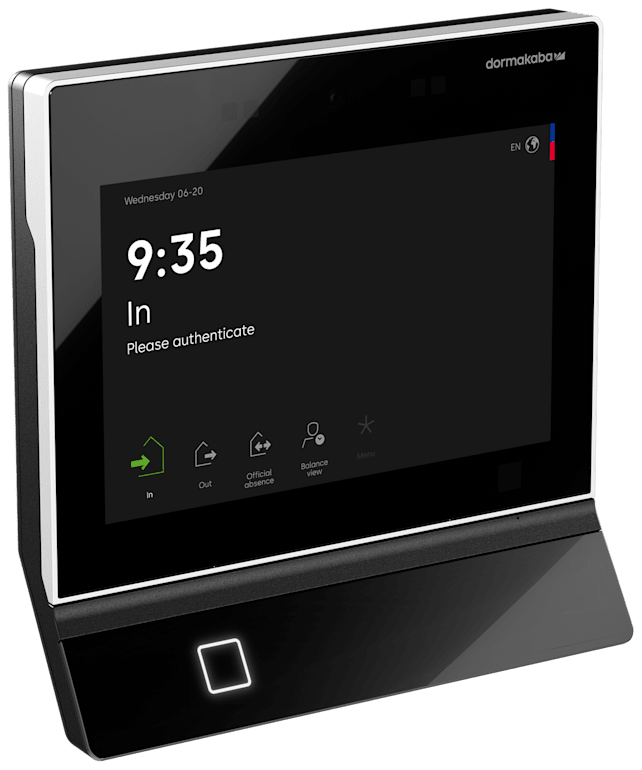
jay cloud supports terminal, mobile, and browser time recording, along with employee self-service. That gives buyers recording options to assess for production employees, office staff, and people working on the go.
The hardware approach is also relevant to a Kronos replacement. jay cloud states that all hardware for time and access can be integrated and provides central device management with automatic updates and security patches. Nevertheless, ask for confirmation of each existing device model, its proposed connection method, and any work needed before deciding to retain it.
Our guide to SAP SuccessFactors time clock integration explores the questions to ask about terminals and the surrounding data flow.
HCM-driven workplace changes
jay cloud’s operating model starts with synchronizing workforce data from the HCM system. Access rights, shift models, and visitor policies are derived from HR data, with hires, moves, and departures driving workplace changes.
This is useful when the project extends beyond attendance. A departmental move can be an HR event and an access-policy event. A departure can require both closing out time processes and removing building access.
jay cloud is 100% cloud, with no on-premise infrastructure. Its stated security architecture includes end-to-end encryption, role-based access controls, and full audit trails. These are concrete review points for IT and security, not a substitute for your own technical assessment.
UKG Pro WFM versus an HCM-native approach
UKG Pro WFM is generally positioned as a dedicated workforce-management platform. It may be the better fit when workforce-management requirements justify a distinct operational platform alongside SuccessFactors. Verify its current capabilities and SAP integration options directly with UKG.
An HCM-native approach may fit better when SuccessFactors is intended to govern workforce data and the main requirement is connected time recording and workplace administration. The distinction is about where responsibilities sit, not whether one vendor is universally better.
| Decision area | Evaluate UKG Pro WFM when… | Evaluate jay cloud when… |
|---|---|---|
| Target architecture | You want a dedicated WFM platform alongside SuccessFactors. | You want an HCM-driven layer for Time, Access, Visitor, and Life Safety. |
| Operational requirements | Broader WFM requirements are central; verify coverage with UKG. | Terminal, mobile, and browser time recording are central requirements. |
| SAP relationship | You are validating the proposed integration and ownership model. | SAP BTP and the certified SuccessFactors Time Tracking Service and Time Sheet interface match your design. |
| Employee lifecycle | You are assessing how UKG handles changes alongside your HCM. | You want HR data to drive workplace rights and policies. |
| Physical workplace scope | You are checking how the proposed solution fits access and visitor systems. | You want to evaluate time, access, visitors, and emergency roll call together. |
| Replacement effort | You are planning a Workforce Central-to-Pro WFM reimplementation. | You are testing a different architecture rather than recreating Workforce Central. |
This matrix is a shortlist tool, not a feature-by-feature verdict. Confirm current capabilities with each vendor and score both options against the same requirements. For a fuller architectural comparison, read our UKG Pro Workforce Management alternative guide.
Build a proof of fit around real workflows
A successful demonstration should expose exceptions, not just show a clean employee clock-in. Give vendors a representative set of roles, sites, shifts, and employee changes, then ask them to trace the resulting records and responsibilities.
Test time recording and corrections
Include a production employee using a terminal, an office employee using a browser, and a mobile worker. Ask where each record is created, how it reaches the intended SuccessFactors service, and who can review or correct it.
Include missed punches, overnight work, and assignment changes. These are evaluation scenarios, not assumptions about supported functionality. Document what works as standard, what requires configuration, and what falls outside the proposed scope.
Test lifecycle changes and access
Create a new hire, move an employee between departments, and end an employment relationship. Ask each vendor to show which systems change, when the change becomes effective, and how exceptions are handled.
For jay cloud, this tests its HCM-driven workplace model. For any proposed solution, it helps reveal remaining manual administration. Our guide to offboarding physical access revocation provides additional questions for HR and security.
Test hardware and emergency accountability
Inventory terminals, readers, doors, locations, and network dependencies before agreeing on a device strategy. Require a device-by-device implementation plan rather than treating general hardware compatibility as a completed design.
If emergency accountability is in scope, jay cloud combines time, access, visitor, and HR records for emergency roll call, with real-time attendance status and intelligent muster points. Test how those records relate to your actual evacuation process. The emergency headcount guide explains the operational questions; confirm applicable obligations with counsel.
Plan the replacement without copying every legacy rule
Start with a requirements register that separates business needs from historical configurations. A rule that exists in Workforce Central may still be essential, or it may reflect an old workaround. HR and operations should validate the distinction before IT rebuilds it.
Next, document the target ownership model: SuccessFactors responsibilities, the replacement platform’s responsibilities, device administration, and any downstream interfaces. Make unresolved boundaries visible early.
Finally, agree on acceptance criteria before cutover. Include time-record accuracy, correction workflows, employee changes, hardware operation, and support responsibilities. Run representative parallel checks where appropriate and decide who can approve each process for production use.
The support deadline creates urgency, but it should not replace this work. A defensible decision links the chosen architecture to demonstrated requirements and an implementation plan.
Frequently asked questions
Is jay cloud an option for organizations replacing Kronos Workforce Central?
Yes, it is worth evaluating when SAP-driven time recording and connected workplace processes match the requirements. It should not be assumed to replace every Workforce Central workflow without a scoped proof of fit.
What is certified in jay cloud’s SuccessFactors integration?
jay cloud has an SAP-certified interface for SuccessFactors Time Tracking Service and Time Sheet. It is also built natively on SAP BTP and was developed in close cooperation with SAP through the Co-Innovation Program.
When might UKG Pro WFM be the better fit?
UKG Pro WFM may fit when a dedicated workforce-management platform is central to the operating model. Validate your detailed requirements, current integration capabilities, and reimplementation scope directly with UKG rather than assuming continuity from Workforce Central.
Can existing time terminals be retained?
jay cloud states that all hardware for time and access can be integrated. Confirm the specific device models, connection approach, and implementation requirements before making a retention decision.
Does a certified interface guarantee working-time compliance?
No. A certified interface does not establish that your configuration, policies, and operating procedures meet every applicable requirement. Validate the solution against your rules and confirm legal obligations with counsel.
Choose the architecture before the replacement
The right Kronos alternative for SAP SuccessFactors depends on whether you need a dedicated WFM platform or an HCM-driven workplace layer. Test the workflows, confirm the interface scope, and make system ownership explicit. Talk to the jay cloud team about evaluating your SAP, time-recording, and workplace requirements.